How to Choose the Right AI Tools for Construction Project Management

Construction projects are rarely simple. Between deadlines, budgets, compliance, and on-site coordination, even small missteps can throw the whole plan off track. That is why more firms are turning to smarter solutions, to save time, money, and bring real control and clarity to the entire project lifecycle.
One of the most promising shifts in the industry is the use of AI tools for construction project management. But with so many options on the market, choosing the right tool is not always easy.
In this guide, we will break down what to look for while choosing the right tool for construction project management, what to avoid, and how to make the best decision for your specific needs.

The Current Landscape of Construction Project Management
Running a construction project today is like managing different moving pieces, all at once. Between handling bids, scheduling subcontractors, ordering materials, coordinating deliveries, keeping up with safety protocols, and managing client expectations, there is rarely a quiet moment. And the truth is, most teams are doing their best with tools that were never built for this type of complexity.
Many still depend on spreadsheets, scattered email chains, whiteboards, or outdated project software to stay organized. While these methods may have worked years ago, they often fall short in today’s construction environment. What ends up happening is missed details, delayed decisions, budget overruns, and confusion about who is responsible for what.
Not because the people managing the project are not skilled but because they are constantly firefighting without the kind of support modern tools should provide.
Construction sites are dynamic. Problems don’t just show up in reports, they come in real time. And when communication is slow or information is missing, even a small delay can throw off the whole schedule. That is why more project managers are realizing the need for systems that do more than just store data. They need tools that pull everything together, spot issues early, and keep the whole team in sync, even when they are in the office or on the job site.
It’s about finding tools that actually reduce the load. Ones that help people work smarter, not harder. Because in a space where every hour and every detail matters, the difference between barely managing and building with confidence comes down to how well-managed your team is, in terms of manpower and the way information flows.
The Growing Role of Technology in Construction
Over the last ten years, the construction industry has seen a quiet but steady shift toward digital tools. What was once an industry known for manual tracking and physical paperwork is now using mobile apps, cloud-based dashboards, and smart scheduling systems.
Project teams can now update tasks from the field, view real-time data on progress, and even collaborate remotely. That is a big step forward, but there is still a long way to go. In many cases, teams are still jumping between different platforms, each with its own login and layout, none of them fully connected.
This creates a frustrating workflow where information gets lost, communication slows down, and people waste time entering the same data in multiple places. Integration is missing, and that gap often becomes the source of delays, errors, and misaligned decisions.
So while construction has started to use technology, the next challenge is building systems that are digital, and intelligent. Systems that learn from patterns, respond to changes in real time, and help managers make better calls before things go off-track.
This is where smarter tools, especially those built with adaptive logic and data processing, can make a real impact. Not by replacing people, but by enhancing what they already do.
In practical terms, these tools can forecast delays by looking at scheduling trends or flag safety concerns by analyzing site images or sensor data. They can also optimize when to order materials based on weather predictions or supplier timelines, helping projects stay on schedule and within budget.
Equipment downtime or labour availability, these tools can track all that too, helping teams use resources more efficiently. Even documentation becomes easier, with features that auto-tag images, organize reports, and keep progress updates flowing without extra effort.
The end result is fewer surprises, quicker decision-making, and better results across the board. But it’s important to note that what works well for one industry doesn’t always translate to construction. Tools designed for warehouses or factories might look good on paper but miss the mark on a job site. That is why choosing the right tool is about finding one that truly fits how construction teams work every day.
Features to Look For in Smarter Project Management Tools
Not all project management tools are built the same, especially when it comes to construction. What works for a tech startup or retail chain may completely miss the mark on a busy job site. When choosing a smart tool for managing construction projects, it is about real-world functionality that aligns with how your team works, communicates, and solves problems every day. Below are some features that make a difference.
1. Real-Time Data Integration
Your tool should be able to bring together information from multiple sources, even if it’s updates from mobile apps, sensor inputs on machinery, supplier systems, or weather alerts. When data flows into one place instantly, you are not waiting for end-of-day reports or chasing someone for an update. You can see what is happening as it happens and respond before small issues become big ones.
2. Predictive Analytics That Actually Help
A good tool helps you see what might go wrong. Look for tools that analyze patterns in labor, weather, supply delivery, or even past project timelines to flag risks early. If it can reliably warn you about a possible delay, that insight alone could save weeks of trouble.
3. A Clean, Easy-to-Use Interface
No matter how powerful a tool is, it will not be used if it feels like a chore. Your team needs a dashboard that is easy and intuitive. People in the field should be able to access it on their phone and know what to do next without a training manual.
4. Strong Mobile Compatibility
Construction doesn’t happen behind a desk. If your software only works properly on a desktop, that’s a problem. Look for tools that are just as functional and responsive on mobile devices, so your team can check updates, enter data, or flag issues on the go.
5. Customization and Scalability
Every construction project is different in size, scope, and workflow. Choose a tool that can be configured to suit your exact needs now and grow with you as your operations expand.
6. Built-In Collaboration
Project success depends heavily on communication. A tool that allows tagging, commenting, and assigning tasks directly within the platform helps everyone stay aligned. You reduce the risk of messages getting lost in email or instructions being misunderstood.
7. Support for Compliance and Documentation
Construction comes with a lot of paperwork: safety checklists, permits, inspections, change orders. Your tool should make it easier to manage, not harder. Even if it is auto-generating reports or organizing documents for audit purposes, good compliance support saves time and avoids costly mistakes.
Evaluating AI Tools: Step-by-Step Process
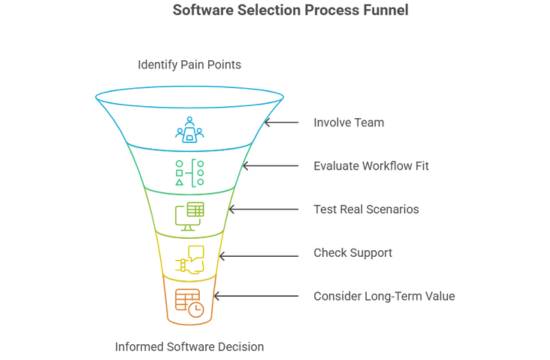
Here is the step by step process to evaluate AI tools:
Step 1: Define Your Needs Clearly
Start by identifying your biggest pain points. List out your challenges before looking into software demos.
Step 2: Involve the Team Early
Get input from the teams. After all, they will be the ones using the tool daily.
Step 3: Look Beyond the Features
Focus on whether the tool fits your daily workflow and integrates with what you already use.
Step 4: Test with Real Scenarios
Don’t just watch a demo, ask for a trial. Use the tool with real data from one of your current or past projects to see how well it holds up.
Step 5: Check for Support & Training
Even the best tool will not help if your team doesn’t know how to use it. Look for strong onboarding, training, and customer support.
Step 6: Consider Long-Term Value
Don’t base your decision on cost alone. Consider how much time and money it will save over the course of a full project or year.
Mistakes to Avoid When Choosing AI Tools
When it comes to choosing smart tools for managing construction projects, a few common mistakes can impact long-term success.
One of the biggest is skipping the trial. A demo or sales pitch might look convincing, but unless you test the tool with real project data and daily workflows, you will not know how it actually performs in your environment.
Another one is focusing too much on price. While budgets matter, a cheaper tool that fails to solve your real problems will end up costing more in delays, and errors.
User experience is also often not considered. If the interface is too technical, your team will not use it consistently, and the best features in the world will not matter if no one is using them.
Integration is another key area that gets missed. Your new tool should work well with the systems you already rely on. If it can’t sync with existing platforms, it just adds more confusion and disconnect.
Finally, it is easy to pick a tool that works for today, but make sure it has room to grow with your business. Choosing a system that scales smoothly saves you from having to start over when your projects get bigger.
The Human Side of AI in Construction Management
When we talk about AI in construction, it is easy to get caught up in features and technical specifications. But at the end of the day, these tools are only valuable if they help the people using them. That is where many platforms fall short, they are built for data, not for the teams in the field doing multiple roles.
AI should work more like a good teammate than a complex system. It should give the project manager more breathing room, help the site supervisor catch issues early, and support the planner in adjusting schedules. When it does that, adoption becomes natural, because the team sees the value without needing to be convinced.
Take, for example, communication gaps on-site. Maybe a delivery was delayed and no one updated the whiteboard, or a team member did not know the blueprints had been revised. With AI integrated into your workflow, that kind of thing can be caught in real-time. A smart system might detect a materials delay, cross-check with updated schedules, and alert the concerned person on their mobile device. That is real support where it matters.
Another area AI is quietly transforming is site safety. Some tools now analyze site photos or camera footage to check for compliance, like if workers are wearing helmets or if machinery is left running unattended. It is about giving them extra eyes, on large or fast-moving projects.
Even document management is getting smarter. Instead of sorting through hundreds of folders or relying on someone’s memory, AI can tag, categorize, and consider relevant plans, RFIs, or change orders instantly. So when your client asks for a specific version of a plan or a date-stamped approval, you are not running through email chains, you have got it in seconds.
Ultimately, the success of any tool comes down to whether it makes the work easier, not just more digital. AI in construction should reduce friction. It should take away the repetitive stuff, like checking status reports or sending reminders, so your team can focus on what they are actually good at: solving problems, managing people, and keeping the build on track.
And when your team feels supported, they perform better. Confidence goes up, stress goes down, and projects stay tighter on time and budget. That is the kind of outcome AI should aim for, efficiency, but real, human-centered progress.
How AI Can Help Make Construction Projects Better?
As new challenges come up, like increased regulation, supply chain volatility, or labor shortages, your ability to adapt quickly can make or break a project. That is why forward-thinking construction firms are investing in AI systems that can grow with them.
Scalability means choosing a platform that does not set back when your project size doubles or when your team expands across multiple job sites. A scalable AI system adjusts without forcing you to overhaul your workflow.
For example, you are a mid-size firm managing five projects at the same time. Suddenly, you land two large contracts and now you’re managing ten, and half your current processes don’t scale. If your project management tools are not built to handle this growth, you are looking at communication gaps, missed deadlines, and burnt-out teams.
Smart platforms see that kind of shift. They let you add users without slowing performance, create custom workflows per site, and connect all of it through one dashboard. It is about making complexity manageable, because growing doesn’t have to mean breaking.
Another big thing is integration. As construction sites adopt more connected devices, drones, sensors, smart equipment, your AI tools need to speak the same language. A future-proof system pulls in that sensor data, merges it with scheduling, and helps you spot patterns, like equipment downtime tied to weather or bottlenecks caused by late materials.
Also important is the growing role of remote work in construction. More stakeholders are working offsite, reviewing documents from home, or checking site progress on mobile devices. Your tools need to support that shift, offering the same experience even when you are at HQ, in a trailer, or halfway across the city.
The most successful firms in the coming years will not just be the fastest or cheapest. They will be the ones that adapt fastest and AI tools play a huge role in that. But the goal is to build smarter, make better decisions earlier, and create room for real innovation.
Common Signs Your Current Tools Are Holding You Back
If your construction team is constantly in catch-up mode, your tools might be part of the problem. Many firms don’t realize just how much time and money they are losing by staying with outdated systems, until the signs become too hard to ignore.
One of the first challenges is information delays. If your team has to wait for a report at the end of the day, or someone is always chasing updates through email or WhatsApp, it’s a clear sign that your current setup is not built for real-time collaboration.
Another sign is duplicate work. When people enter the same data into multiple systems or update five different trackers just to log a task, it is annoying and inefficient. It slows everything down and increases the chance of costly errors.
Also, take a look at how your teams communicate across locations. If job sites, vendors, and the office are constantly out of sync, or updates are not making it to the right people at the right time, your tools are not doing their job.
And if your team does not use software, that is a problem. Maybe it is too technical, or just doesn’t match how they actually work on-site. If your people avoid it, it is not helping.
Good technology should feel like a helping hand. If any of these sound familiar, it might be time for a better system. One that adapts to your workflow, not the other way around.
How WEBaniX Helps You Make the Right Choice?
At WEBaniX, we know that no two construction projects are ever the same. That is why we don’t just hand over a piece of software and wish you luck. We take the time to understand your unique challenges, goals, and day-to-day workflows before making any recommendations. Even if you are coordinating multiple contractors across a hospital build or managing tight deadlines on a residential tower, our team works side by side with yours to figure out what’s actually needed, not just what looks good in a demo.
We don’t believe in one-size-fits-all solutions. What you get with WEBaniX is a thoughtful, hands-on approach that puts real results first. From choosing the right project management tools to integrating them with your existing systems, we guide you every step of the way.
Our job is not finished once the system is live, either. We stay in the picture post-deployment, offering full support, updates, and guidance, so you are never left struggling with a platform that doesn’t make sense or waiting days for a simple answer.
What makes us different is that we care just as much about the outcome as you do. Our focus is on helping you build better, more efficient processes that save time, reduce waste, and keep your team in sync from day one.
Conclusion
Choosing the right tools for construction project management is more than a tech decision; it is a foundation for how your business will operate, grow, and succeed over time. When the right systems are in place, your team spends less time on paperwork and back-and-forth communication, and more time doing what they do best, bringing ideas off the page and into the real world.
At WEBaniX, we help construction companies choose solutions that work in the field, where it really matters. From the first conversation to ongoing support, we are in it with you.
Ready to take the next step?
Let’s build something smarter together. Contact us for more information.